


Facebook Twitter LinkedIn RSS
    Trending
    • LG Electronics Nigeria Issues Consumer Alert on Counterfeit TVs, Reinforces Promise of Quality 
    • AI Founders and developers to converge in Lagos for AI in Action Now 2026 conference
    • KPMG identifies several flaws in Nigeria’s new tax law
    • West Africa Prepares for Record-Breaking Attendance at Ibom Blockchain Xperience 2026
    • MNOs refund ₦10 billion to customers for failed transactions, as NCC and CBN set to implement framework in March
    • The majority of IT professionals show openness to Cyber Immunity
    • Top three areas data streaming brings value to organizations
    • Nigeria to strengthen local research with launch of AI centre at UniJos
    Facebook Twitter LinkedIn
    ITPulse.com.ngITPulse.com.ng
    • News
    • Interviews
    • Blogs
    • Analysis
    • Opinion
    • Videos
    • Press Releases
    • Pictures
    • Advertise
    ITPulse.com.ngITPulse.com.ng
    Home»Blogs»Explore your payment option on the PalmPay App 
    Blogs 2 Mins Read

    Explore your payment option on the PalmPay App 

    mmBy ITPulseAugust 28, 2024
    Facebook Twitter WhatsApp Pinterest LinkedIn Reddit Tumblr Email
    Palmpay
    Share
    Facebook Twitter LinkedIn Pinterest Email

    Just before you complete your payment, have you taken the time to look at your payment options? If you have not, this is for you!

    In our fast-paced world, there are details we naturally ignore due to urgency. Imagine making a call and your airtime finishes, the first thing you want to do is to quickly top-up your airtime within the minute to return to the call.

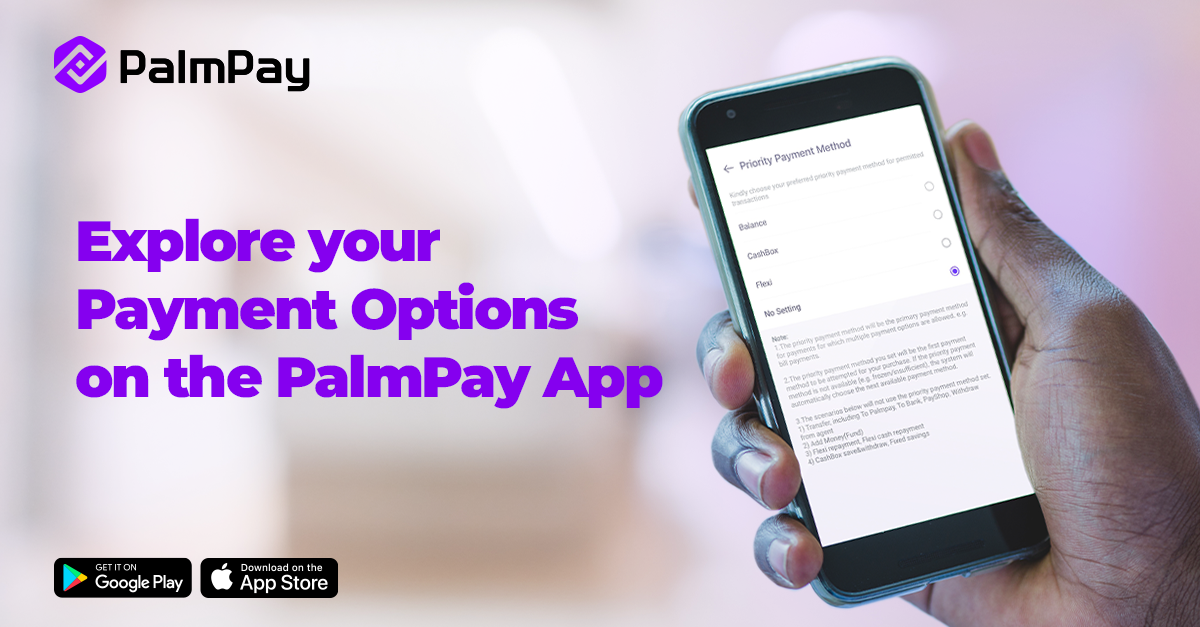
    To make payment seamless, PalmPay has an in-app payment feature called Priority Payment Method, that eases transactions.

    What is the Priority Payment Method?

    The feature allows you to choose the primary payment method for which multiple payment options are allowed, such as airtime/data top-up and bill payments.

    What do you need to know?

    1. Your selection will be the first option for airtime/data top-up and bill payment.
    2. The feature does not apply to transfers, PayShop, withdrawals, savings and the likes.
    3. If your set priority payment method is not available, the system will automatically choose the next available payment method.

    How to Set Your Priority Payment Method

    1. Open the PalmPay app and go to Settings
    2. Click ‘Payment Setting’
    3. Select ‘Priority Payment Method’
    4. Choose the Priority Payment Method that suits you best!

    As always, you can reach out to us via social media for customer support.


    Palmpay
    Share. Facebook Twitter Pinterest LinkedIn Tumblr Telegram Email
    mm
    ITPulse
    • Website
    • Facebook
    • Twitter
    • LinkedIn

    ITPulse is a wholly information technology communication (ICT) news website, with a special focus on the African continent. The website provides up-to-date biz-tech news, analysis and comprehensive and thorough insight into the continent's ICT terrain

    Related Posts

    Beyond Pity: Voices, Dignity and the Fight for Inclusion Among Nigerians Living With Albinism

    January 7, 2026

    PalmPay expands presence with new strategic office in Yaba, Lagos

    January 7, 2026

    PERSONALITY PROFILE: Nnaemeka Ani – The Architect of ‘Code and Courage’

    December 29, 2025

    Leave A Reply Cancel Reply

    Subscribe to Updates

    Get the latest creative news from FooBar about art, design and business.

    Latest Posts

    LG Electronics Nigeria Issues Consumer Alert on Counterfeit TVs, Reinforces Promise of Quality 

    January 10, 2026

    AI Founders and developers to converge in Lagos for AI in Action Now 2026 conference

    January 10, 2026

    KPMG identifies several flaws in Nigeria’s new tax law

    January 9, 2026
    About
    About

    Itpulse.com.ng is a wholly information technology communication (ICT) news website, with special focus on the African continent. The website provides up-to-date biz-tech news, analysis and a comprehensive and thorough insight info the continent's ICT terrain.

    Contact us: editorial@itpulse.com.ng

    Facebook Twitter LinkedIn RSS
    Latest Posts

    LG Electronics Nigeria Issues Consumer Alert on Counterfeit TVs, Reinforces Promise of Quality 

    January 10, 2026

    AI Founders and developers to converge in Lagos for AI in Action Now 2026 conference

    January 10, 2026

    KPMG identifies several flaws in Nigeria’s new tax law

    January 9, 2026
    Popular Posts

    PalmPay expands presence with new strategic office in Yaba, Lagos

    January 7, 2026

    Obinna Iwuno exits as SiBAN President following historic tenure

    January 6, 2026

    LG Electronics Nigeria Issues Consumer Alert on Counterfeit TVs, Reinforces Promise of Quality 

    January 10, 2026
    © 2017 - 2026 Itpulse.
    • Terms & Conditions
    • Privacy Policy
    • Advertise
    • Contact Us

    Type above and press Enter to search. Press Esc to cancel.