



Facebook Twitter LinkedIn RSS
    Trending
    • IXPN turns 20, unveils month-long programme to honour Nigeria’s internet pioneers
    • Google introduces Gemini 4 Argon for cybersecurity defenders
    • Xiaomi unveils REDMI Note 17 Series with 10,000mAh battery
    • Nigeria needs more data centres as AI, cloud demand surges
    • NITDA releases core cyber hygiene habits for National Cybersecurity Awareness Month 2026
    • CBN flags cyber and liquidity risks for banks after ₦4.65 trillion recapitalisation
    • OneHealth seeks to address one pharmacist per 13,385 people challenge in Nigeria
    • Free education data goes live: what Nigerian students can now access
    Facebook Twitter LinkedIn
    ITPulse.com.ngITPulse.com.ng
    • News
    • Interviews
    • Blogs
    • Analysis
    • Opinion
    • Videos
    • Press Releases
    • Pictures
    • Advertise
    ITPulse.com.ngITPulse.com.ng
    Home»Blogs»Explore your payment option on the PalmPay App 
    Blogs 2 Mins Read

    Explore your payment option on the PalmPay App 

    mmBy ITPulseAugust 28, 2024
    Facebook Twitter WhatsApp Pinterest LinkedIn Reddit Tumblr Email
    Palmpay
    Share
    Facebook Twitter LinkedIn Pinterest Email

    Just before you complete your payment, have you taken the time to look at your payment options? If you have not, this is for you!

    In our fast-paced world, there are details we naturally ignore due to urgency. Imagine making a call and your airtime finishes, the first thing you want to do is to quickly top-up your airtime within the minute to return to the call.

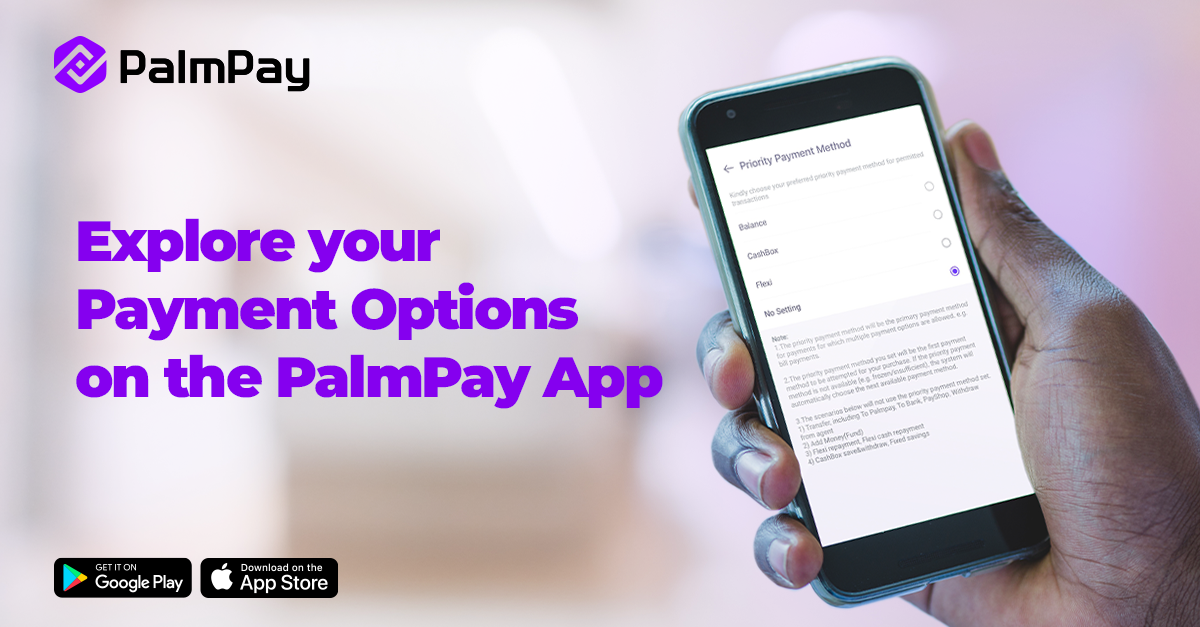
    To make payment seamless, PalmPay has an in-app payment feature called Priority Payment Method, that eases transactions.

    What is the Priority Payment Method?

    The feature allows you to choose the primary payment method for which multiple payment options are allowed, such as airtime/data top-up and bill payments.

    What do you need to know?

    1. Your selection will be the first option for airtime/data top-up and bill payment.
    2. The feature does not apply to transfers, PayShop, withdrawals, savings and the likes.
    3. If your set priority payment method is not available, the system will automatically choose the next available payment method.

    How to Set Your Priority Payment Method

    1. Open the PalmPay app and go to Settings
    2. Click ‘Payment Setting’
    3. Select ‘Priority Payment Method’
    4. Choose the Priority Payment Method that suits you best!

    As always, you can reach out to us via social media for customer support.


    Palmpay
    Share. Facebook Twitter Pinterest LinkedIn Tumblr Telegram Email
    mm
    ITPulse
    • Website
    • Facebook
    • Twitter
    • LinkedIn

    ITPulse is a wholly information technology communication (ICT) news website, with a special focus on the African continent. The website provides up-to-date biz-tech news, analysis and comprehensive and thorough insight into the continent's ICT terrain

    Related Posts

    IXPN turns 20, unveils month-long programme to honour Nigeria’s internet pioneers

    October 2, 2026

    The phone is the new office: how content is creating jobs in Nigeria 

    September 28, 2026

    LG Reinforces Commitment to Customer Choice, Data Privacy and Secure Smart TV Experiences Across Nigerian Homes

    September 25, 2026

    Leave A Reply Cancel Reply

    Subscribe to Updates

    Get the latest creative news from FooBar about art, design and business.

    Latest Posts

    IXPN turns 20, unveils month-long programme to honour Nigeria’s internet pioneers

    October 2, 2026

    Google introduces Gemini 4 Argon for cybersecurity defenders

    October 1, 2026

    Xiaomi unveils REDMI Note 17 Series with 10,000mAh battery

    October 1, 2026
    About
    About

    Itpulse.com.ng is a wholly information technology communication (ICT) news website, with special focus on the African continent. The website provides up-to-date biz-tech news, analysis and a comprehensive and thorough insight info the continent's ICT terrain.

    Contact us: editorial@itpulse.com.ng

    Facebook Twitter LinkedIn RSS
    Latest Posts

    IXPN turns 20, unveils month-long programme to honour Nigeria’s internet pioneers

    October 2, 2026

    Google introduces Gemini 4 Argon for cybersecurity defenders

    October 1, 2026

    Xiaomi unveils REDMI Note 17 Series with 10,000mAh battery

    October 1, 2026
    Popular Posts

    Nigeria needs more data centres as AI, cloud demand surges

    October 1, 2026

    Google introduces Gemini 4 Argon for cybersecurity defenders

    October 1, 2026

    Free education data goes live: what Nigerian students can now access

    September 29, 2026
    © 2017 - 2026 Itpulse.
    • Terms & Conditions
    • Privacy Policy
    • Advertise
    • Contact Us

    Type above and press Enter to search. Press Esc to cancel.