



Sophos has raised the alarm that the ‘safety measures’ email being circulated is a phishing scam, urging individuals and businesses to be on the alert.
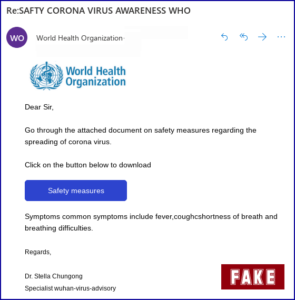
Sophos Security Team reported of the current scam, says it uses the coronavirus to lure unsuspecting businesses and people with the email which carries the logo of the World Health Organization and states:
Sophos said that fortunately, at least for fluent speakers of English, the criminals have made numerous spelling and grammatical mistakes that act as warning signs that this is not what it seems.
“The link you’re asked to click on is similarly, and fortunately, dubious.
“Firstly, it seems to be a compromised music site with a weird name that doesn’t have any obvious connection to any well-known health organisation; secondly, it is an HTTP site, not an HTTPS site, which is sufficiently unusual these days to be suspicious in its own right.
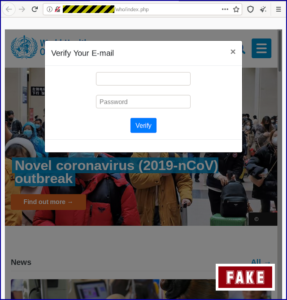
“Nevertheless, the scam page itself is incredibly simple – it can’t have taken the crooks more than a few minutes to put together – and visually effective.
 “The fake page consists of the official, current home page of the World Health Organisation (WHO) with an unassuming popup form on top of it.
“It doesn’t just look like the WHO’s page in the background, it is the WHO’s page, rendered in a frame that’s embedded in the fake site:
“You can see why someone who’s nervous about the coronavirus issue, or who has friends and family in the main areas of infection, or who wants to do the right thing by learning more about preventing the spread of the disease…
“…might fill in the form, perhaps because they are feeling pressurised by (or not thinking clearly because of) the subject matter.
“Indeed, many companies have already sent emails to their staff to offer advice, so reading additional information that is allegedly from the WHO sounds like a sensible and responsible thing to do.
“Of course, if you put in your email address or your password and click through, you’ll be submitting the filled-in web form to the crooks.
 “Worse still, you’ll be submitting it over an unencrypted connection.
“So anyone else on the same network as you, for example in your hotel lobby or the coffee shop, could potentially capture your network traffic and see the username and password you just put in.
“Once you’ve clicked the [Verify] button, the crooks simply redirect you to the real WHO site at who DOT int, which looks just like the previous page you were on, minus the popup form…
“…with the rather obvious exception that the address bar now looks (and is) correct, displaying the genuine WHO website name, showing a padlock and – if you click through and view the web certificate – a certificate that shows up as issued to the WHO itself.
Sophos also offered measures on what to do about it:
Never let yourself feel pressured into clicking a link in an email. Most importantly, don’t act on advice you didn’t ask for and weren’t expecting. If you are genuinely seeking advice about the coronavirus, do your own research and make your own choice about where to look.
Don’t be taken by the sender’s name. This scam, says its from “World Health Organization”, but the sender can put any name they like in the From: field.
 Look out for spelling and grammatical errors. Not all crooks make mistakes, but many do. Take the extra time to review messages for telltale signs that they’re fraudulent – it’s bad enough to get scammed at all without realising afterwards that you could have spotted the fraud up front.
Check the URL before you type it in or click a link. If the website you’re being sent to doesn’t look right, stay clear. Do your own research and make your own choice about where to look.
Never enter data that a website shouldn’t be asking for. There is no reason for a health awareness web page to ask for your email address, let alone your password. If in doubt, don’t give it out.
If you realise you just revealed your password to imposters, change it as soon as you can. The crooks who run phishing sites typically try out stolen passwords immediately (this process can often be done automatically), so the sooner you react, the more likely you will beat them to it.
Never use the same password on more than one site. Once crooks have a password, they will usually try it on every website where you might have an account, to see if they can get lucky.
Turn on two-factor authentication (2FA) if you can. Those six-digit codes that you receive on your phone or generate via an app are a minor inconvenience to you, but are usually a huge barrier for the crooks, because just knowing your password alone is not enough.